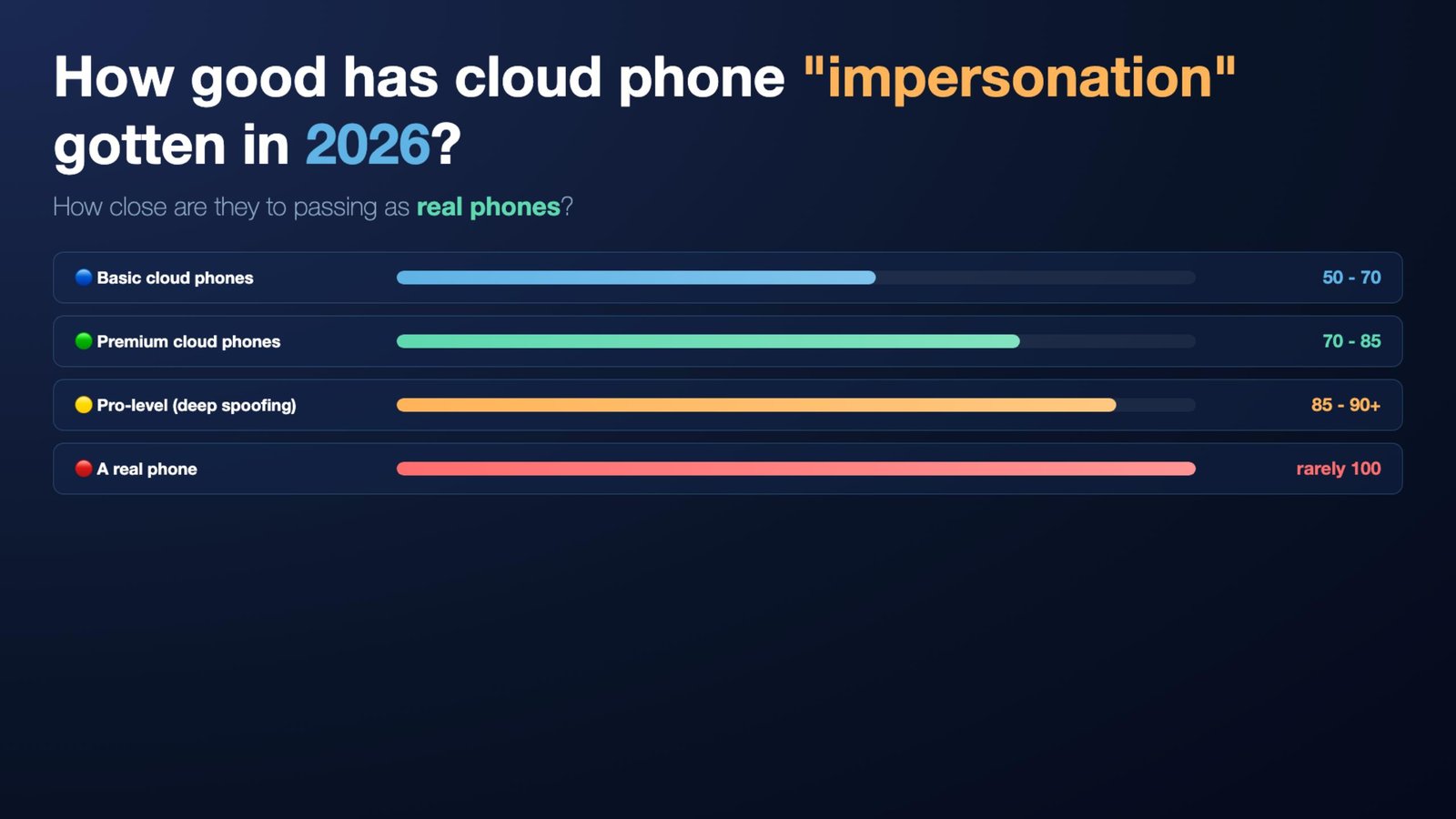
9 mainstream environments claim to run Android. Only 1 is actually a real hardware device. The other 8 are containers, emulators, or cloud phones — and I busted every one of them using a single free app that spits out a report in 3 seconds.
Why bother running this test
Cloud phone services collectively have hundreds of millions of monthly active users. Matrix-style live streaming, mobile-game auto-play, signup-bonus farming, reward mining — almost all of it runs on top of these environments.
Meanwhile financial apps, banks, Google Pay, TikTok, Douyin, and Steam all run device-risk detection. Fail the fingerprint check and the app usually warns the user or refuses to launch, both to protect users and to protect the business from losses.
So the question I actually wanted to answer: in 2026, how close are cloud phones to perfectly simulating a real phone? Close enough that you can't tell them apart at all?
Test setup — three tools
Side-by-side comparison from the device-fingerprint angle. Three tools:
DevCheck AI. Reads 30+ hardware fields — SoC model, CPU vendor, GPU name, core count and RAM, sensor list, network adapter state, build fingerprint, kernel version, bootloader unlock state, root traces, whether the device has been hooked by Frida-class tools, and more — then runs them through a rules engine that returns a hardware trust score from 0 to 100. Free on Google Play. Installed on all 9 environments.
Google Play Integrity API. The default check every serious financial and mainstream app uses to decide whether the runtime is trustworthy.
Revolut. A financial app with industry-strict risk control. Real-world question: can the environment even launch the app and complete login or signup?
Real phone baseline
I used Unity Cloud Real Devices — a farm that lets you remotely control real, physical phones for app-compatibility testing. Borrowed 3 different units, tested each for 5 minutes.
OPPO Reno8 Pro — 94. The 6 lost points broke down like this. USB debugging on (developer signal). And the interesting one: "this phone behaves like a server, it doesn't reboot." To share the unit across users, Unity's farm had left it powered on for 206 straight days. Daily users reboot at least once inside a hundred-day window. Uptime that anomalous costs points — even a real phone loses points if its usage pattern doesn't look like a daily driver.
Then I installed Revolut. Instant black screen with red text: "This app cannot run because it wasn't installed from an official platform. Please reinstall from an approved vendor like Google Play." The OPPO is a real phone, no root, no modified ROM — but the sideload path alone was enough. Apps run risk control from several angles, not just the device fingerprint.
Honor 100 — 97. China-market unit, no Google services. SPIC returned error negative 9: "Binding to the Play Store has failed." Can't even reach the Play Store, let alone pass Play Integrity. This is the day-to-day reality for mainland Chinese users — anything that needs Google verification simply doesn't work.
Samsung Galaxy Note — 97. Very similar. Revolut threw the same "not from Google Play" rejection. Installed from Play, the app launches fine.
Baseline: OPPO 94, Samsung 97, Honor 97. All real phones — risk control on any major app will green-light them.
Cloud phone #1 — Redfinger
China's biggest cloud phone brand. Main pitch is mobile-game auto-play automation. Millions of monthly active users. Bought one month for 26 yuan (~$4) and connected.
First impression: 209 ms latency. Half a second between tap and response. Resolution was fine, games ran.
DevCheck AI: 97 out of 100. "Hardware trust extremely high, very likely a real phone." Basically tied with a real phone. Redfinger even passed the USB-debugging check — which Unity's real-device farm couldn't.
Where it lost points: the fingerprint. Claims to be a Redmi Note 3 — a Xiaomi — but the chip reports as Rockchip. Rockchip has never shipped in a real Xiaomi phone. Sensor data on the side (types, count, live updates) all fine.
Then I opened the memory monitor. 31 gigabytes of RAM. Redmi Note 3 is a 2015 phone; the max real config was 3 GB. Redfinger just exposed the server's full 31 GB. Not remotely plausible.
Same screen, dynamic performance panel — CPU, memory, thermals, network. CPU frequency graph stays constant. Never moves. Real phones scale frequency continuously with load. Another gap to patch.
Redfinger passed every static device-info rule — build fields, chip signature, model info can all be forged. Dynamic runtime behaviour gave it away in seconds. Usage pattern + constant CPU frequency + 31 GB RAM = physically impossible for a Redmi Note 3.
Takeaway: a high score doesn't mean it's real. Dynamic runtime behaviour is harder to fake than static fields — and easier to overlook, easier to catch.
Cloud phone #2 — DuoDuo Cloud
Another China-market provider with millions of MAUs. DevCheck AI: 94. Report flagged one line: "Rockchip RK3588S is not in the phone database."
The RK3588S ships in dev boards, industrial controllers, security cameras, and NAS units. No retail phone. Running Android on one works fine — the chip label just gives you away.
Root check: the su binary sits at /system/xbin/su. Pre-rooted out of
the box. This environment was never trying to impersonate a daily user — it's meant for developers
to flash ROMs and debug.
Dynamic side: memory doesn't have Redfinger's problem of leaking the full server RAM. DuoDuo's 4 GB looks reasonable. CPU usage moves. But the frequency graph is flat, same problem as Redfinger.
Cloud phone #3 — LDCloud
Leidian Cloud Phone. Same maker as Leidian Emulator, the PC-side Android emulator that's been around for over a decade. Score: 74.
The killer is physical impossibility. Claims a Snapdragon chip, but the GPU is PowerVR B-Series BXT-32-1024. Qualcomm Snapdragon has paired with its own Adreno GPU since 2008 — that's a chip-design-level binding, not a marketing choice. Pairing Snapdragon with PowerVR would require someone duct-taping fields from two different boards together.
Second red flag: claims 4 CPU cores, but /proc/cpuinfo exposes 8. Two different
numbers to two different consumers. Neither lines up.
Cloud phone #4 — VMOSCLOUD
Bought the flagship "premium real device" tier to see how well the real-phone simulation holds up. Added their Singapore Singtel exit proxy — both device layer and IP layer maxed.
Whoer network fingerprint first: "disguise 100%." IP, DNS, browser fingerprint — the network layer was cleanly done.
DevCheck AI: 92 — "very likely a real phone." Claims to be a Xiaomi 15 (current flagship) on Snapdragon SM8850. Two clear slip-ups:
- Xiaomi 15 should be Snapdragon SM8750, not SM8850. The model string reads "Xiaomi 17" — not Xiaomi 15 as claimed.
- GPU reads Mali-G610. That's ARM's reference GPU, used in MediaTek. Snapdragon = Adreno, never Mali.
The rest of the fingerprint and kernel fields are meticulous — includes the specific Xiaomi model code and even the OGKI string. Set aside the Mali label leak and the flat CPU-frequency curve (a common flaw across cloud phones) and the simulation is genuinely high fidelity.
Emulator #1 — BlueStacks Air 5.21
The most stable Android emulator on Mac. DevCheck AI gave it 84. Solid score. Slip-up: it forgot to simulate a proximity sensor.
Every real phone has a proximity sensor — it's the thing that dims the screen when you hold the phone to your face during a call. Emulators never take calls, so nobody bothered to add the virtual sensor. DevCheck AI checks the sensor list, sees proximity missing, deducts.
Emulator #2 — Genymotion
Score: 10. Red text in the report: "Not a genuine device — Emulator." Not even trying.
Battery current reads 9,223,372,474,941,440 milliamps. That's INT64 max — the "unset" default. Real phone battery current sits between −1000 and +5000 mA. Genymotion didn't bother forging the field.
Motherboard codename: goldfish_arm64. "Goldfish" has been the Android emulator
codename since 2008 — every engineer knows it. GPU name reads "Apple M5 OpenGL Translator" — this
thing is running on Apple Silicon via macOS's Metal-to-OpenGL translation.
Genymotion's strategy is honest: "I am an emulator, and I'm not hiding it." Built for developer testing, not signup-bonus farming.
Emulator #3 — Google's own Android Emulator
Also 10. Motherboard also goldfish_arm64. GPU called "Android
Emulator OpenGL ES Translator" — same translation approach as Genymotion.
Emulator #4 — Redroid
1 out of 100. Runs on an x86 server.
CPU: Intel Xeon E5-2650 v2. A 2013 data-center CPU that shipped at $2000 apiece. It should never appear in a phone. Confirms Redroid is exactly what it says on the tin — a Docker container running Android on Linux.
Sensor count: zero. Device identifier literally contains "redroid." Build type userdebug,
signed with test-keys — Android developer debug builds. Retail phones are always
user builds signed with release-keys.
The default Redroid image doesn't impersonate anything at all. It's an open-source project for automated testing and CI — Alibaba and ByteDance use it to run Android integration tests.
The Revolut litmus test
Installed Revolut on every one of the 8 cloud phones and emulators. Opened it. Same red message every time: "The app cannot run on an emulator. Please use an official device" — or a device-incompatible message with similar wording.
Compare that with Unity's real cloud devices, which threw the "need to install from Google Play" message. The cloud phones and emulators all failed the environment check. 8 out of 8, zero exceptions.
Which tells you: hardware fingerprint is only the first gate. Fool DevCheck AI with a 97 and Revolut still runs Play Integrity's DEVICE and STRONG tiers. Those require hardware key signing, ROM AVB signature state, whether the ROM is Google-authorized, whether the bootloader is locked — all things cloud phones cannot simulate. What they can pass relatively easily is BASIC — plain system compatibility.
Actual Play Integrity results: best was VMOSCLOUD, which claimed to pass "triple green" but actually passed "double green" — STRONG failed, almost certainly because there's no hardware crypto module to emulate. Second best was Redfinger with the BASIC "single green." The rest often couldn't complete the test at all, hitting "Binding to the Play Store has failed" because the cloud phone's local network can't reach Google.
Recommendations
- Testing app compatibility? Use Google's official Android Emulator. Free, and it's a Google product.
- Running automated tests? Use Redroid. Free, containerized, cleanest CI integration, lightweight.
- Trying to bypass anti-fraud or grind signup bonuses? Don't. Stores keep tightening, anti-detection keeps evolving. 2026 anti-fraud is not 2020 anti-fraud. Even VMOSCLOUD, Redfinger, or DuoDuo behind a stable proxy — a banking app rejects you inside a second.
- Want to know whether the phone in your hand is real, tampered, refurbished, or a cloud phone in disguise? Install DevCheck AI. Three seconds to a report.
My site is specdeviceinfo.com — a hardware fingerprint database with over 83,000 verified real devices. Drop your phone's Build fields into the database and you'll know in seconds whether it's genuine. Free, no signup.
Full video walkthrough — with the 24-field × 9-environment data table — on YouTube or Bilibili.